
ep. 85. Back to School Vibes
5 min read


This time tomorrow, I’ll be making my way to UC Berkeley campus to kick off my new graduate course, UX for AI. My classroom will include 30 professional master’s students entering the job market within the next two years. Most are aiming for design and product roles.
I know what you’re thinking: What design and product roles?
Tech in general has been mired by post-pandemic layoffs, disproportionately affecting entry-level roles. The UX job market is a mess. Designers and product managers were affected by layoffs at a higher rate than engineers.
That said, there are reasons for hope.
First, hiring is slowly opening back up. No, not pre-pandemic-level opening-up, but not quite as bad as it’s been. Design roles are up almost 20% since the 2023 dip; product roles are up almost 54%. There’s also a general explosion in AI jobs. That includes roles at AI-specific companies like OpenAI and Anthropic and AI-specific roles at non-AI companies (e.g., AI PM at Figma). This includes emerging roles that require AI-wrangling expertise, such as design engineer.
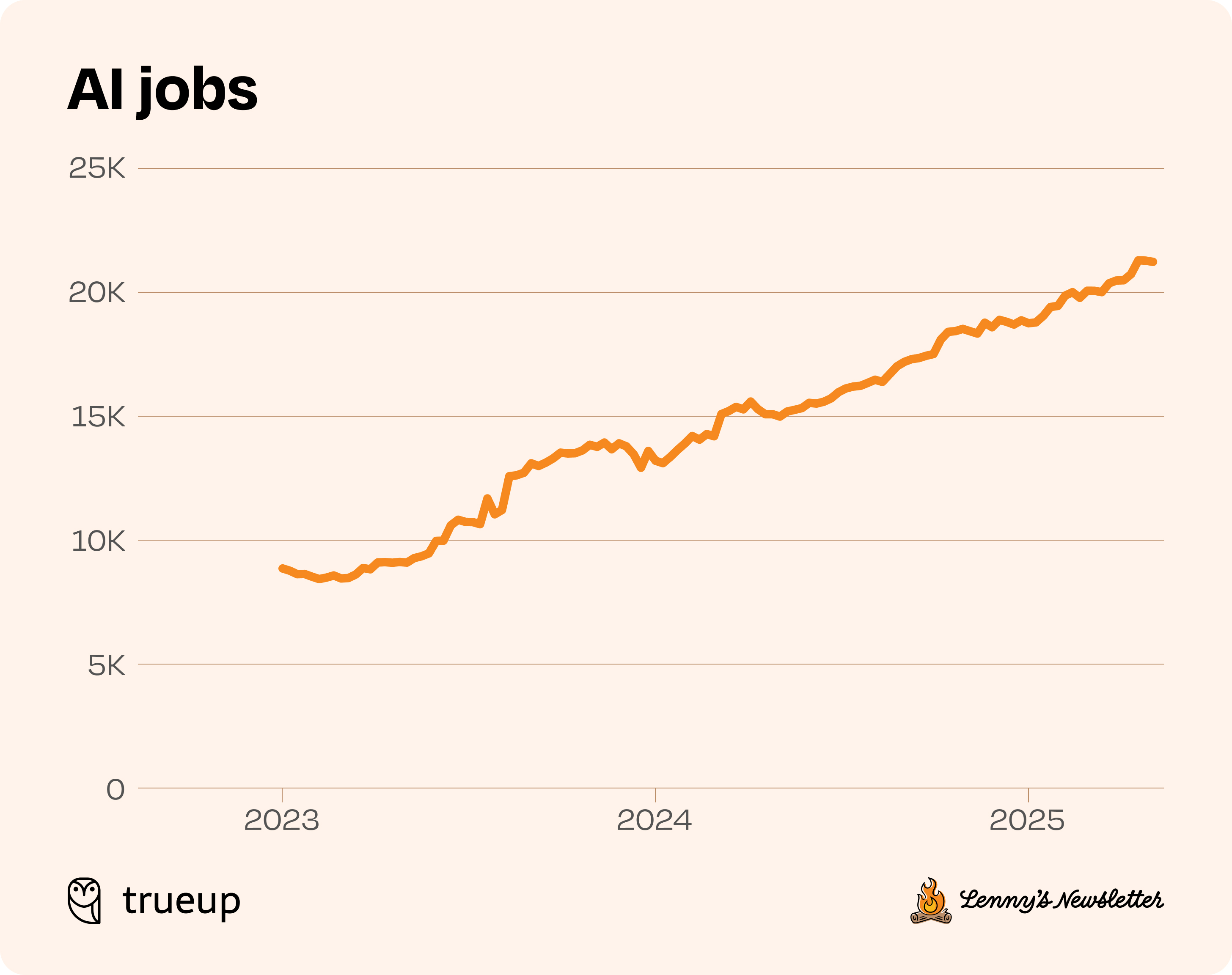
AI skills are also increasingly tied to career advancement. Google, Amazon, and Meta now include AI use in performance reviews, with employees being asked to demonstrate how they increased their efficiency using AI tools.
What does this all mean for junior candidates, specifically?
Don’t get me wrong, the job market for entry-level roles is still rough. However, junior candidates do have a unique advantage over the old guard: Coming of age with AI tools.
For example, Elena Verna, Head of Growth at Lovable, the fastest-growing startup in history, recently sang the praises of new AI-native grads at the company. She called BS on the narrative that entry-level jobs will be automated away. Instead, fresh talent without years of industry baggage can see opportunities AI can unlock from a new perspective, making them an asset to teams.
Elena’s sentiments echoed a theme I’d heard across guest lecturers last Fall in my Intro to UX Design class. All of these folks, ranging from designers, to PMs, to founders, highlighted the importance of effectively applying AI tools and, relatedly, junior candidates’ unique advantage. A quote that stuck with me was a calculator analogy shared by guest Jason Kwok, PM at Meta:
“Some teams are still doing the equivalent of balance sheets on paper. Be the generation that knows how to use the calculator. In 2-5 years, the gap will be stark.”
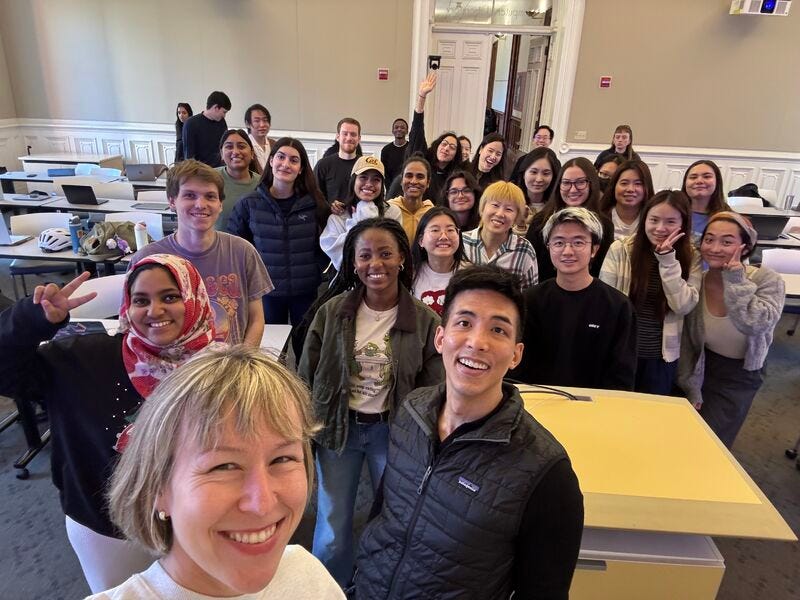
These students are that generation, and this new course is all about calculators: how to use them, when to use them, how to make them, and—in a mind-bending act of calculator-inception—using one to make more.
Fresh Vibes
In a course where the learning objective is for students to become AI-native thinkers and builders, vibe coding is going to play a significant role. This isn’t about becoming a Cursor expert or a Lovable expert, especially when the landscape and capabilities are rapidly evolving. Instead, the aim is for students to build intuition about working with AI through hands-on exploration and making, and develop a critical eye for where these tools can augment their UX workflow.
Because this space is moving SO fast, and because I’m a researcher at heart, I decided to conduct some interviews to keep the course grounded in the latest_latest ways people are using vibe coding.
In a caffeine-fueled, 3-day listening tour, I spoke with 14 practitioners spanning product, design, and engineering. All used vibe coding in their practice, with tools including Bolt, Cursor, Claude Code, Figma Make, Lovable, Replit, and V0. Here’s a topline of what I learned.
The vibes only flow if you’re a thoughtful context curator.
Several practitioners fed a PRD and Figma design into tools like V0 or Lovable. Others crafted a prompt with detailed instructions about what the tool was supposed to create, accompanied by a screenshot of a wireframe or a UI that followed an existing design system. Regardless of the exact method, everyone started their vibe coding workflow with curated context. This starting point was much more intentional and structured than the term “vibe” suggests.
Maintain control through iterating in chunks.
After you’ve supplied your curated context and hit “enter”, you’ll get output that still requires tweaking. You need to take a disciplined, incremental approach to iteration to prevent AI models from “forgetting” context. For example, you might break down the highest priority workflow for the app and vibe code it step-by-step. Otherwise, you risk AI confidently veering off course, leading to frustrating, duplicative re-work down the line.
Bring a prototype instead of a PowerPoint to your next meeting.
Going into these conversations, I hypothesized that vibe coding would hurt collaboration through siloing, such as engineers running off with prototypes without consulting design. I was pleasantly surprised when I consistently heard that prototyping improved cross-functional collaboration.
Prototypes, whether they’re vibe coded or not, provide a concrete starting point for conversation. They’re a type of boundary object: a shared reference point that supports alignment and decision-making, even though each function brings their own lens (a designer thinking about applying design systems, or an engineer thinking about how to bring it to production). By enabling faster prototype creation, vibe coding shifts conversations away from clarifying what you meant on Slide 5 to discussing implementation tradeoffs.
Distinguish between prototypes and production-ready apps.
Prototypes test ideas. By definition, they are disposable, so the underlying code doesn’t matter much. Jump into Figma Make or Lovable and start building.
Production-level apps are different. What’s under the hood matters when you’re building end-to-end apps. Understanding foundational concepts like data structures and algorithms will get you farther, faster.
Most practitioners I interviewed came from data science or computer science backgrounds before moving into product or design roles. Regardless of whether this is sampling bias or a trend, their dual perspective positioned them uniquely to assess what technical knowledge actually matters for vibe coding.
The consensus: you don’t need a CS degree to vibe code a shippable app (that would defeat the point). However, basic programming concepts will help you more effectively architect your experience. This will be more relevant if you’re a non-technical founder looking to ship an app than if you’re a PM or designer who can work with an engineer who can help with build out the backend.
💡Pro tip 1: Most of the folks building production apps swore by Claude Code (Replit was in second place). These tools allow you to build more complex experiences, but also involve working with a command line interface.
💸 Pro tip 2: Keep an eye on your credit limits, especially when building end-to-end apps. Claude Code, while incredibly powerful, sucks credits like a Dyson on Redbull. Then there’s Replit, which automatically switches to pay-as-you-go once you exhaust your monthly credits.
Yep, Still in the Loop
Vibe coding has automated prototyping and coding work that would have previously taken hours, requiring specialized expertise.
However, I (still) don’t think the singularity is coming.
These tools are just that—tools, which need humans to steer them to be useful. Context curation is one of those things that humans are better at than machines. The clear problem framing and systems thinking required to thoughtfully curate that context are also automation-resistant.
A key outcome of my course, alongside students creating vibe-coded portfolio pieces, is having them reach the conclusion that the difference between slop and not-slop continues to be expert human judgement.
💬 What vibe coding knowledge do you want to impart on the next generation of design and product leaders? Let me know in the comments.
⏪ Recent Episodes
ep. 84: The Importance of Anticipation
ep. 83: The Lawn Mower that Ate the Soccer Field
ep. 82: Live from Toronto: AI x Design Panel Recap & Reflections
📖 Good Reads
“I applied.” (But did you, though?) (haley rose). Even if you’re a qualified AI-native junior candidate and there’s a role, hitting “apply” on LinkedIn doesn’t mean you applied for it.
Everyone wants a room where they can escape their screens (Nora Knoepflmacher, Wall Street Journal): Analog rooms free of screens and smart devices are trending in America.
Epistemological fault lines between humans and artificial intelligence (Walter Quattrociocchi, Valerio Capraro, Matjaž Perc, Computers & Society): AI can sound convincing without actually checking or understanding what is true. This makes us offload important parts of thinking like judging, questioning, and verifying, without realizing it.
That’s a wrap 🌯 . More on UX, HCI, and strategy from Sendfull in two weeks.
The calculator analogy is spot on. I've been seeing this play out with new hires recently, the ones who approach AI tools as thoughtful context curators (not just prompt mashers) are already leagues ahead. Love how the curated context part challanges the casual "vibe" label, its more like intentional systems thinking meets rapid prototyping.
Love it! Hyper personalized software as part of everyone's DNA